Smolsies - My Cute Pet House
- 4.1
- Rating
- 50.00M
- Installs
- Free
- Price

 Analysis by App-foxy
Smolsies - My Cute Pet House is the kind of game I open when I want something gentle, colorful, and easy to understand without a long tutorial. I collect eggs, hatch small animals, look after them, and spend time with them through simple activities. It is aimed at children and families, but I found that its relaxed pace can also suit adults who enjoy light virtual-pet games rather than demanding challenges.
Developed by TutoTOONS, this free educational game has an Everyone content rating and works on devices running Android 6.0 or later. Its appeal is straightforward: the player builds a growing group of cute pets and keeps them engaged. The game does not try to be a complex simulation. Instead, it focuses on short interactions, visual rewards, and a friendly home environment that is easy to revisit.
How the game feels to use in everyday play
I find the everyday appeal here lies in being able to drop in, notice the pets, and choose a small activity without committing to a long session. That makes it easier to fit play around a quiet break or a child’s changing attention, though I’d still set boundaries on device time and purchases. The next section looks at how that gentle rhythm works once the game is in a player’s hands.
You May Also Like

 Blood Strike: 2.5 Anniversary
Blood Strike’s Loadouts Turn Every Drop Into a Tactical Gamble
A close look at Blood Strike’s custom loadouts: how fast access to signature weapons reshapes its battle royale rhythm, rewards preparation, and narrows the gap between fights.

 Pandora - Music & Podcasts
Pandora’s Music Is Easy to Start, but Harder to Recover
Pandora’s strength is its low-effort path from a seed to a station. Its weak spot is how much confidence it asks you to place in connection, setup, and quiet recovery.

 8 Ball Pool
 Is Built on Rivalries, Rematches, and Routine
A close look at the rivalries, rematches, shared routines, and unanswered safety questions that turn a quick pool match into a persistent mobile community.

 Samsung Music
’s Quiet Strength Is Playing What You Already Own
Its reach comes less from spectacle than from dependable access to a personal library. That simplicity is both the app’s strongest retention engine and its ceiling.

 AccuWeather: Weather Radar
AccuWeather Review: A Quick, Clear Forecast for Everyday Decisions
For everyday plans, the best forecast is the one you can understand quickly. AccuWeather makes rain timing, radar, and local conditions easy to act on, with a few trade-offs.

 Hill Climb Racing
Why Hill Climb Racing Still Turns Crashes Into One More Run
A tiny car, a bumpy hill and one more upgrade: Hill Climb Racing keeps resurfacing because its simple chaos makes every near-miss feel personal.
More From Our News Desk
View All News


Readability and navigation for young players
My first impression was that the presentation does most of the teaching. The pets, eggs, rooms, and activity areas are visually distinct, so I could usually understand where to tap without reading a large amount of text. That matters for children who are still developing reading confidence, and it also helps anyone who prefers learning through pictures and trial rather than instructions.
The central idea is easy to follow: find an egg, hatch it, care for the resulting animal, and use the available activities to keep the pet experience moving. The interface is built around familiar visual cues, which makes the game less intimidating than an educational title filled with menus, objectives, and written explanations. I would still sit with a younger child during the first session, not because the concept is difficult, but because children may need help understanding what each icon does and what the game is asking them to do next.
Navigation is most comfortable when the player is not rushing. I could explore the pet house, notice a character that needed attention, and move between activities at my own pace. That makes the game approachable for children who become frustrated when a game constantly pushes them toward the next task. It also gives parents a chance to turn play into conversation: a child can describe what the pet is doing, choose which animal to visit, or explain why a particular activity is fun.
One useful habit is to let the child discover the screen before offering help. If an adult immediately points out every button, the game becomes a sequence of instructions from someone else. When I allowed a player to experiment first, the visual design encouraged curiosity. Assistance was most useful when the child had already tried a few taps and needed help connecting an icon with its purpose.
The game’s educational value is informal rather than lesson-based. It can support recognition, sequencing, attention, and simple decision-making because the player repeatedly observes a pet, chooses an action, and sees a result. I would not use it as a replacement for a structured learning app, handwriting practice, or a subject-focused game. Its learning comes through caring routines and interaction, not through a clearly separated curriculum.
Motor demands and sensory comfort
The basic controls are suited to touchscreens: tapping, selecting, and moving through the pet environment. I did not need advanced coordination or fast reflexes to understand the main loop. That makes the game more welcoming for children who are new to mobile games, players with limited gaming experience, and adults who want something that can be played with one hand during a quiet break.
There is an important distinction between being easy to operate and being accessible to every player. A child with reduced fine-motor control may still find small interactive targets difficult, especially if several visual elements are close together. A player with tremors or involuntary movement may also trigger the wrong object. I would test the game on the intended device before handing it to a child who needs larger targets or very forgiving touch interaction.
For sensory preferences, the bright cartoon presentation is a major part of the attraction, but it may not suit everyone. Children who are sensitive to vivid colors, animated movement, or busy screens could become tired sooner than children who enjoy strong visual stimulation. I found that shorter sessions work better than leaving the game open for a long period. A calmer room, lower device brightness, and reduced background distractions can make the experience easier to manage, although those adjustments come from the device and surroundings rather than from a promise that the game itself offers specialized sensory controls.
Sound is another factor worth checking before play. Some children focus better with audio, while others become distracted by repeated effects or music. I recommend starting with the device volume low and watching the player’s reaction. If the child follows the pets more easily with sound, increase it gradually; if the audio competes with conversation or causes discomfort, silent play may be preferable. This simple test is more useful than assuming that every child will respond to the cheerful style in the same way.
The game is also a reasonable option for players who need frequent pauses. Progress is built around small interactions rather than a long competitive match, so a child can play for a few minutes and stop without the pressure of finishing a level. That makes it practical for waiting rooms, travel, or a transition between activities. I would avoid presenting it as a reward that must be completed perfectly, because the relaxed pet-care idea works best when the player can return without anxiety.
Using it across different situations
A realistic use case is a child waiting while a parent finishes an appointment. The child can spend a short period checking the pets, opening the game’s activities, and then put the device away when called. The game’s gentle structure is better suited to this situation than an action game that becomes stressful when interrupted. I would prepare the device first, check the volume, and make sure the child knows that the session can end at any moment.
It can also work as a shared activity between an adult and a child. Instead of handing over the phone and walking away, a parent can ask the child to explain which pet they want to visit or what they think will happen next. That turns a solitary screen activity into a small language and reasoning exercise. The adult can also notice whether the child understands the visual navigation or is simply tapping randomly.
For children who do not enjoy competition, the absence of a strongly competitive identity is helpful. The focus is on pets and playful interaction, not on beating another player. This can make it more comfortable for a child who avoids games with rankings or failure screens. On the other hand, children who need clear goals, measurable challenges, or a sense of mastery may lose interest because the experience is intentionally soft and repetitive.
On a shared family device, I would establish a simple routine. Let one child choose a pet, give another child a turn with an activity, and avoid making the number of unlocked animals the measure of success. This reduces arguments and keeps the game from becoming a race. It also reveals a trade-off: the title is easy to share socially, but it is still primarily designed around individual touch interaction rather than a formal cooperative mode.
The game may be useful during quiet time for a child who needs a predictable activity, but it should not be used to assume that every child will self-regulate automatically. A visually appealing pet game can still hold attention longer than intended. I would use the device’s normal family rules for session length and breaks, especially for younger players.
What it offers compared with other children’s games
Compared with puzzle games built around letters, numbers, or problem-solving, this title is less direct as an academic tool. A child practicing a specific school skill will probably get more focused value from a dedicated literacy or mathematics app. The strength here is emotional and routine-based: the player cares about small characters, notices changes, and repeats simple actions in a friendly setting.
Compared with virtual-pet alternatives, the egg-and-hatching concept gives the experience a clear reason to return. There is a sense of anticipation in discovering what comes next, while the pet house provides a familiar place to revisit. The trade-off is that collecting can become the main motivation. If a child becomes focused only on obtaining more animals, the caring and exploratory side may receive less attention.
Compared with action-oriented children’s games, the controls are less demanding and the atmosphere is less tense. That makes it a better choice for calm play, early touchscreen experience, or a child who dislikes losing. A child who wants rapid movement, deep strategy, or increasingly difficult challenges should choose something else. Smolsies is not trying to compete with those genres, and judging it by their standards would miss its purpose.
The game is free to download, but it includes in-app purchases ranging from $1.49 to $159.99 per item. That is the point I would take most seriously before giving a child unrestricted access. I would use the device’s purchase protections and discuss expectations in advance. The free entry makes it easy to try, but a family should decide its rules before the child becomes attached to collecting and asks for additional content or items.
Remaining barriers and practical limits
The main barrier is not the basic concept; it is the combination of visual busyness, touch precision, and the possibility of purchase pressure. A child with visual-processing difficulties may need an adult to identify the most important interactive areas. A child with motor difficulties may need a larger screen or a different device position. These are not reasons to dismiss the game, but they are reasons to test it rather than assume that an Everyone rating guarantees a comfortable experience for every child.
Text-free or image-led navigation can help early readers, yet it can also leave some players guessing. If a child cannot interpret an icon, the game may not explain the choice in a way that is immediately clear. I found that asking the child to describe the screen was better than taking over. When the problem was a control rather than a concept, a brief demonstration solved it; when the child simply preferred different activities, giving them choice worked better.
Another limitation is repetition. The same gentle pattern that makes the game approachable can make it feel shallow to older children. Adults looking for a substantial educational challenge may find that the game supports playful learning without providing detailed feedback about progress. It can encourage attention and responsibility in a loose sense, but it does not replace a teacher, a workbook, or a structured developmental program.
Device context matters too. A small phone screen may make the cute details harder to distinguish and may increase accidental taps. A tablet can be more comfortable for shared play, particularly when an adult is sitting beside a child, but the game is still being controlled through touch. If a child has difficulty holding a device steady, a stand or a stable table can make the session less tiring.
I also would not choose this as the main game for a child who needs strong audio descriptions, high-contrast presentation, switch access, or carefully adjustable interaction settings. The experience may still be worth testing, but I would only recommend it after observing the specific player. For those needs, an app designed explicitly around the required accessibility tools is likely to be a better starting point.
Who should try it, and who should skip it
I would recommend it to families looking for a low-pressure pet game, to young children beginning to explore touchscreen play, and to players who enjoy collecting cute characters without competitive stress. It is especially suitable when the goal is a short, friendly activity that can be paused easily. The Everyone rating reinforces that broad family positioning, though parents should still make their own decision based on the child’s sensitivities and abilities.
I would be more cautious for children who become upset when they cannot unlock something, who are strongly affected by bright animation, or who need precise accessibility features. I would also skip it for anyone seeking serious educational progression. The educational category describes the general style, but the real experience is closer to playful care, discovery, and routine than to a lesson plan.
The scale of its audience suggests that the concept has broad appeal: it has passed 50 million installs, carries an average rating of 4.1 from around 228 thousand ratings, and has about 4.5 thousand written reviews. I mention that context because it helps explain why the game feels designed for immediate accessibility rather than for a narrow specialist audience. Popularity does not settle the accessibility question, but it does fit the game’s simple, welcoming approach.
My inclusive verdict
After spending time with it, I see Smolsies - My Cute Pet House as a friendly first step into virtual-pet games, not as a complete educational solution or a universal accessibility choice. Its strongest quality is the low-pressure loop: hatch a pet, interact with it, explore a little, and return later. That structure can suit children who need flexibility, families sharing short play sessions, and players who prefer visual discovery to complicated instructions.
My practical recommendation is to try it together at first. Watch whether the child can distinguish the interactive objects, whether the colors and movement feel comfortable, and whether the touch controls match their motor abilities. Set purchase restrictions before play, agree on breaks, and use the first session to learn what the child actually enjoys. Those steps make a bigger difference than simply relying on the age label.
The current version is 8.0.336, and the game is available free of charge with optional purchases. That combination makes it easy to sample, but families should treat the purchase range as a real part of the decision rather than an afterthought. If you want a calm pet experience with a playful collecting theme, I think it is worth trying. If you need formal learning outcomes, advanced accessibility controls, or deep challenge, another app will likely serve you better.
Overall, I would hand it to a child who enjoys cute animals and benefits from gentle, interruptible play, while staying nearby during the first few sessions. Its inclusive potential comes from its simple pace and visual clarity, but its remaining barriers mean that personal testing still matters. For the right player, it is a pleasant little pet house; for everyone else, the same softness may feel repetitive or insufficiently focused.
FAQs for Smolsies - My Cute Pet House
01What is the main objective of Smolsies - My Cute Pet House?
Smolsies - My Cute Pet House is a virtual pet game where players can hatch, collect, and care for adorable creatures known as Smolsies. The main objective is to nurture these creatures, ensuring they are happy and healthy by feeding, cleaning, and playing with them. Players can also decorate their virtual pet house and engage in fun mini-games.
02Is Smolsies - My Cute Pet House suitable for children?
Yes, Smolsies - My Cute Pet House is designed to be a family-friendly game suitable for children. It features simple controls, colorful graphics, and an engaging environment that encourages creativity and responsibility. The game is perfect for kids who love animals and enjoy interactive play, promoting both fun and educational experiences.
03Does Smolsies - My Cute Pet House require an internet connection?
Smolsies - My Cute Pet House can be played offline, which means an internet connection is not required for basic gameplay. However, certain features, such as in-app purchases and updates, may require an internet connection. Playing offline allows users to enjoy the game anywhere without worrying about connectivity issues.
04Are there in-app purchases in Smolsies - My Cute Pet House?
Yes, Smolsies - My Cute Pet House includes optional in-app purchases. While the game itself is free to download and play, players can choose to buy additional items or features that enhance the gameplay experience. These purchases are entirely optional and not necessary to enjoy the core elements of the game.
05Can I customize my Smolsies and their environment?
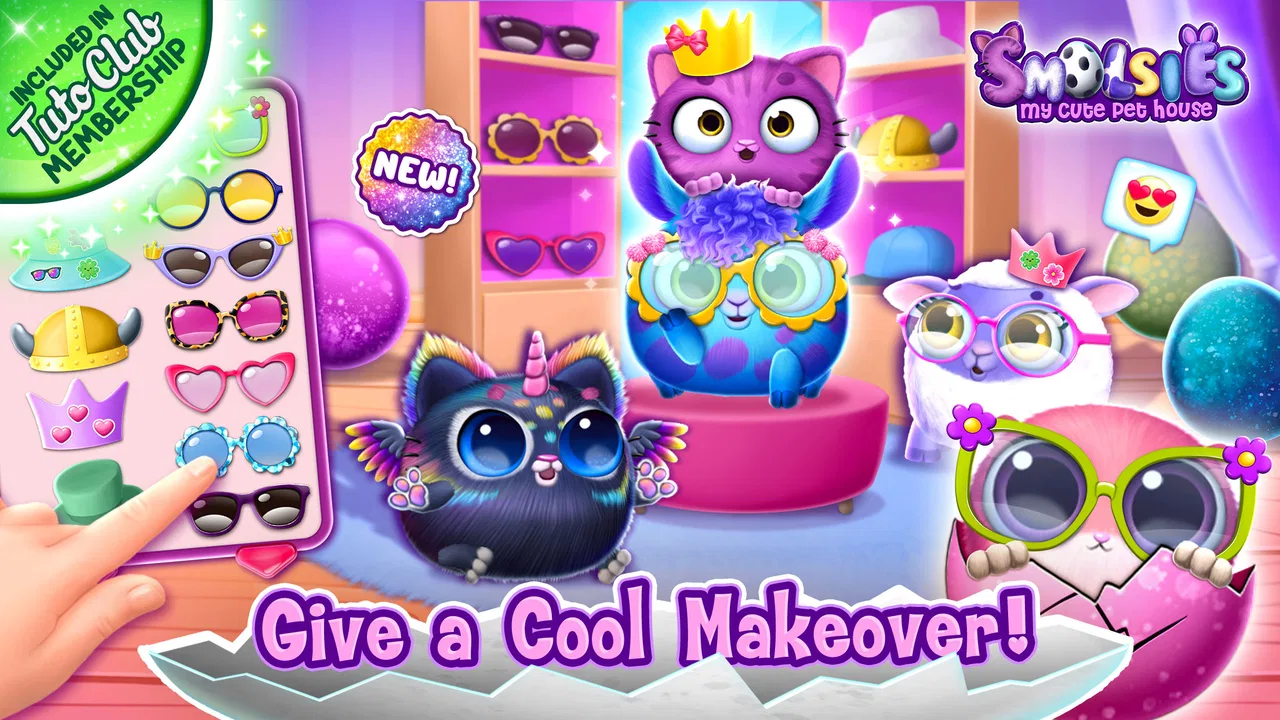
Absolutely! Customization is a key feature of Smolsies - My Cute Pet House. Players can personalize their Smolsies with various accessories and outfits, as well as decorate their pet house with a range of furniture and decorations. This allows for a unique and personalized gaming experience, catering to the player’s creativity and style.
Pros
- Adorable graphics and animations.
- Simple and intuitive gameplay.
- Encourages creativity and care.
- Frequent updates with new features.
- Offline play available.
Cons
- In-app purchases can be pricey.
- Limited customization options.
- Repetitive tasks may bore some.
- Ads can be intrusive at times.
- Requires storage space.

Smolsies - My Cute Pet House
Gallery